> ## Documentation Index
> Fetch the complete documentation index at: https://docs.gallabox.com/llms.txt
> Use this file to discover all available pages before exploring further.
# Migrating from v1 Agents to v2
> Migrate all v1 Chat AI Agent flows to v2 with one click before v1 stops on August 26, 2026.
Gallabox is turning off v1 Chat AI Agents on **August 26, 2026**. Use the one-click migration in **AI Agents & Bots**. You do not rebuild the agents by hand.
> **Who can use this?**
>
> * Owners and Admins, and roles that can update AI agents.
> * Available on plans that support Chat AI Agents.
Migration is **irreversible** once you confirm. It migrates **every v1 flow on the account in one action**. You cannot pick individual flows. Read this page before you click Confirm.
## Plan Availability
Available on all plans that support Chat AI Agents. See [Chat AI Agent](/ai-agents-and-bots/chat-ai-agent/overview#plan-availability).
## Before you start
* You can update AI Agents & Bots.
* You know what each v1 flow does today, so you can check the copy after.
* You have time to test and **publish** each migrated agent. Migrated flows land in **Draft**. They do not go live until you publish them.
**Deadline: August 26, 2026.** After that date, any v1 flow that is not migrated and republished as v2 stops. The agent will not reply. There is no extension.
## What carries over
These stay on the migrated flow:
* **Role**, **Goal**, and **Instructions**
* Custom actions on that flow
* Supported Knowledge Base files, moved into a new library named `{flow name} - Migrated Knowledge Base`
Check these after migration:
* **Settings** (model, temperature, drop-off) and **Analyze → Post-session settings**
* Files that did not migrate (unsupported types are skipped)
* Channel assignment, then a real test before you publish
## Steps
1. Go to **AI Agents & Bots**.
2. At the top of the list you will see: *"Your Old AI agent flows will stop working after 26 August 2026. Migrate to the new AI agent flow."*
3. Click **Migrate to New AI Agent**.
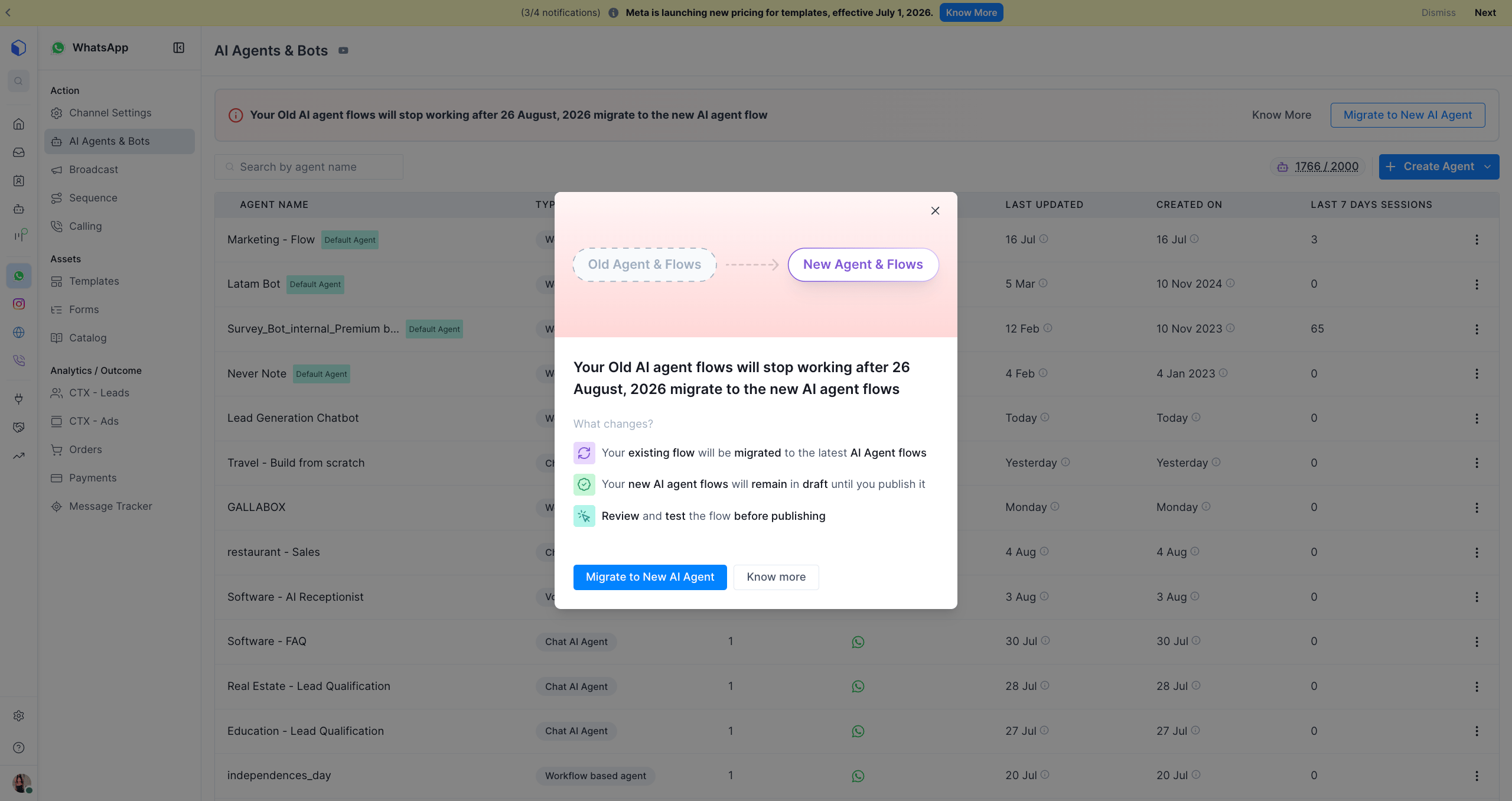 1. A dialog shows **Old Agent & Flows → New Agent & Flows**.
2. Read **What changes?**:
* Existing flows migrate to the latest AI Agent flows.
* New flows stay in **Draft** until you publish them.
* Review and test before you publish.
3. Click **Migrate to New AI Agent**, or **Know more** to read this guide.
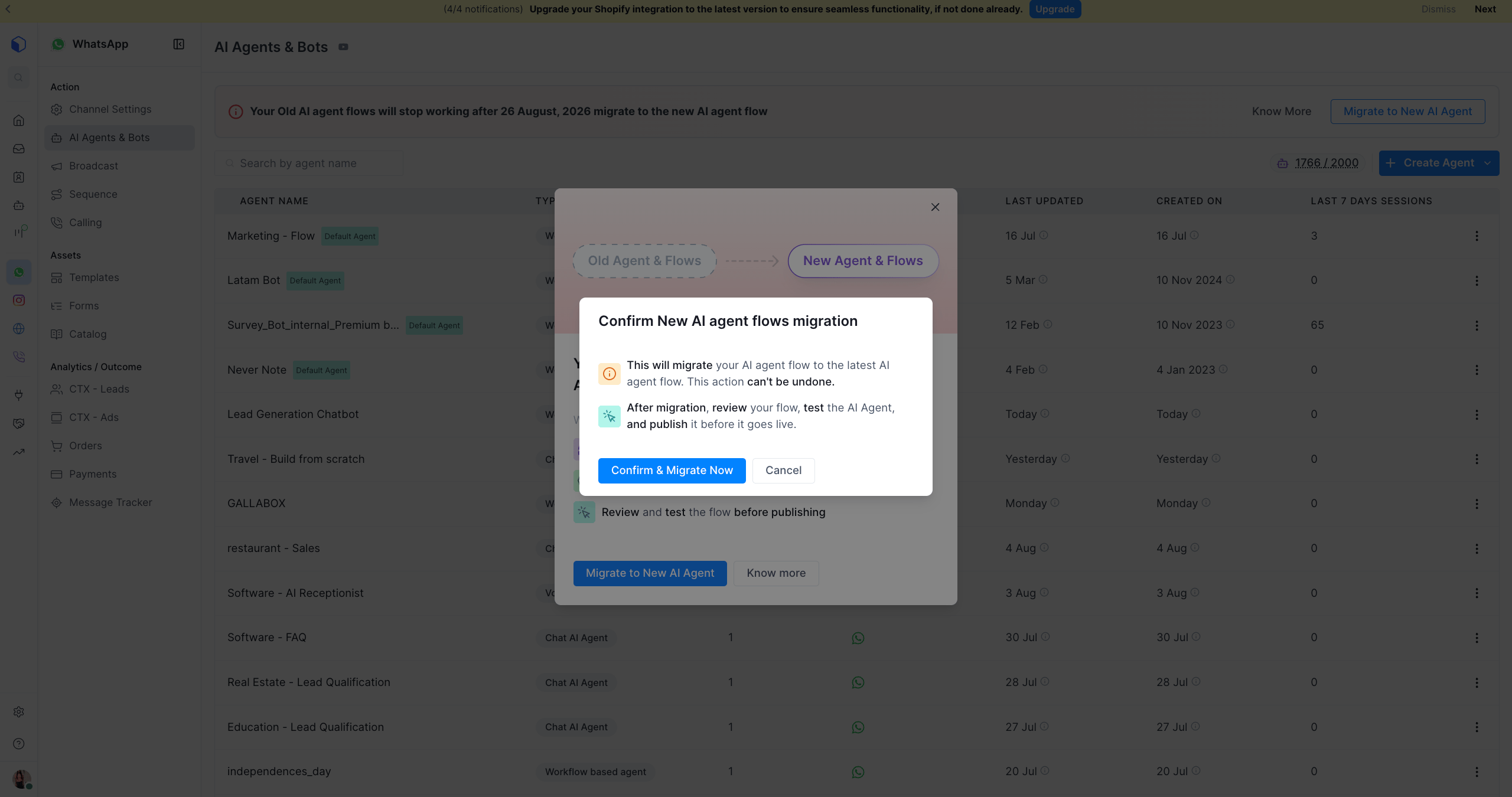
1. A dialog opens: **Confirm New AI agent flows migration**.
2. This cannot be undone once confirmed.
3. Click **Confirm & Migrate Now**.
1. A dialog shows **Old Agent & Flows → New Agent & Flows**.
2. Read **What changes?**:
* Existing flows migrate to the latest AI Agent flows.
* New flows stay in **Draft** until you publish them.
* Review and test before you publish.
3. Click **Migrate to New AI Agent**, or **Know more** to read this guide.
1. A dialog opens: **Confirm New AI agent flows migration**.
2. This cannot be undone once confirmed.
3. Click **Confirm & Migrate Now**.
 There is no "select which agents" step. Confirming queues **all** v1 flows on the account.
1. You will see **Migration queued**: *"All V1 AI flows on this account are being migrated to V2."*
2. It runs in the background. You can keep using Gallabox.
3. Refresh **AI Agents & Bots** after a few minutes.
1. Open each migrated agent. It is in **Draft**.
2. Check **Role**, **Goal**, and **Instructions**.
3. Confirm the migrated Knowledge Base is attached on the **Knowledge** tab.
4. Test. WhatsApp and Instagram: **Test Widget**. Web Chat: **Web Widget** preview.
5. Publish when you are satisfied.
Publishing is manual, per agent. Your v1 flow keeps running until you publish its v2 replacement. v1 still stops on August 26, 2026, even if you never published v2. Do not leave this until the last day.
## Related Articles
* [Chat AI Agent Overview](/ai-agents-and-bots/chat-ai-agent/overview)
* [Channel Behaviour](/ai-agents-and-bots/chat-ai-agent/channel-behaviour)
* [Chat AI Agent FAQs](/ai-agents-and-bots/chat-ai-agent/faqs)
This documentation is built and hosted on [Mintlify](https://mintlify.com), a developer documentation platform.
There is no "select which agents" step. Confirming queues **all** v1 flows on the account.
1. You will see **Migration queued**: *"All V1 AI flows on this account are being migrated to V2."*
2. It runs in the background. You can keep using Gallabox.
3. Refresh **AI Agents & Bots** after a few minutes.
1. Open each migrated agent. It is in **Draft**.
2. Check **Role**, **Goal**, and **Instructions**.
3. Confirm the migrated Knowledge Base is attached on the **Knowledge** tab.
4. Test. WhatsApp and Instagram: **Test Widget**. Web Chat: **Web Widget** preview.
5. Publish when you are satisfied.
Publishing is manual, per agent. Your v1 flow keeps running until you publish its v2 replacement. v1 still stops on August 26, 2026, even if you never published v2. Do not leave this until the last day.
## Related Articles
* [Chat AI Agent Overview](/ai-agents-and-bots/chat-ai-agent/overview)
* [Channel Behaviour](/ai-agents-and-bots/chat-ai-agent/channel-behaviour)
* [Chat AI Agent FAQs](/ai-agents-and-bots/chat-ai-agent/faqs)
This documentation is built and hosted on [Mintlify](https://mintlify.com), a developer documentation platform.