> ## Documentation Index
> Fetch the complete documentation index at: https://docs-next.gallabox.com/llms.txt
> Use this file to discover all available pages before exploring further.
# Outgoing Calls
## WhatsApp Human Calling — Outgoing Calls
Outgoing calls (also called **Business Initiated Calls**) are when your agent calls a customer from within a conversation. Because WhatsApp protects users from unwanted calls, **your business must have the customer's permission first.** That permission flow is the most important part of this guide.
> **Before you begin:** Outgoing calls are restricted by Meta for numbers in **the USA, Canada, Egypt, Vietnam, and Nigeria**. If your business number is in one of these countries, you can receive calls but can't place them until Meta enables it.
***
### Call Permission Requests (The Key Concept)
Your business can't call a customer out of the blue. The customer must grant permission first.
#### How you request permission
There are two ways to send a permission request:
| | Free Form Request | Template Permission Request |
| ------------------- | ------------------------------------------------------ | ----------------------------------------- |
| When you can use it | Only while the 24-hour customer service window is open | Anytime, even with no recent conversation |
A customer can also grant permission **without you asking**, in two ways:
* **They call you** — when a customer calls your business, they automatically grant temporary permission for you to call back.
* **Through your Business Profile** — they can allow calls directly from your profile in WhatsApp.
#### What the customer sees and chooses
The request arrives in their WhatsApp as two parts: your message text, followed by a native card titled **"Can \[Your Business] call you?"** with a **Choose preference** button. Tapping it gives them three options:
* **Allow calls** → permanent permission (no expiry; they can revoke anytime).
* **Temporarily allow calls** → permission valid for **7 days**.
* **Not at this time** → declined.
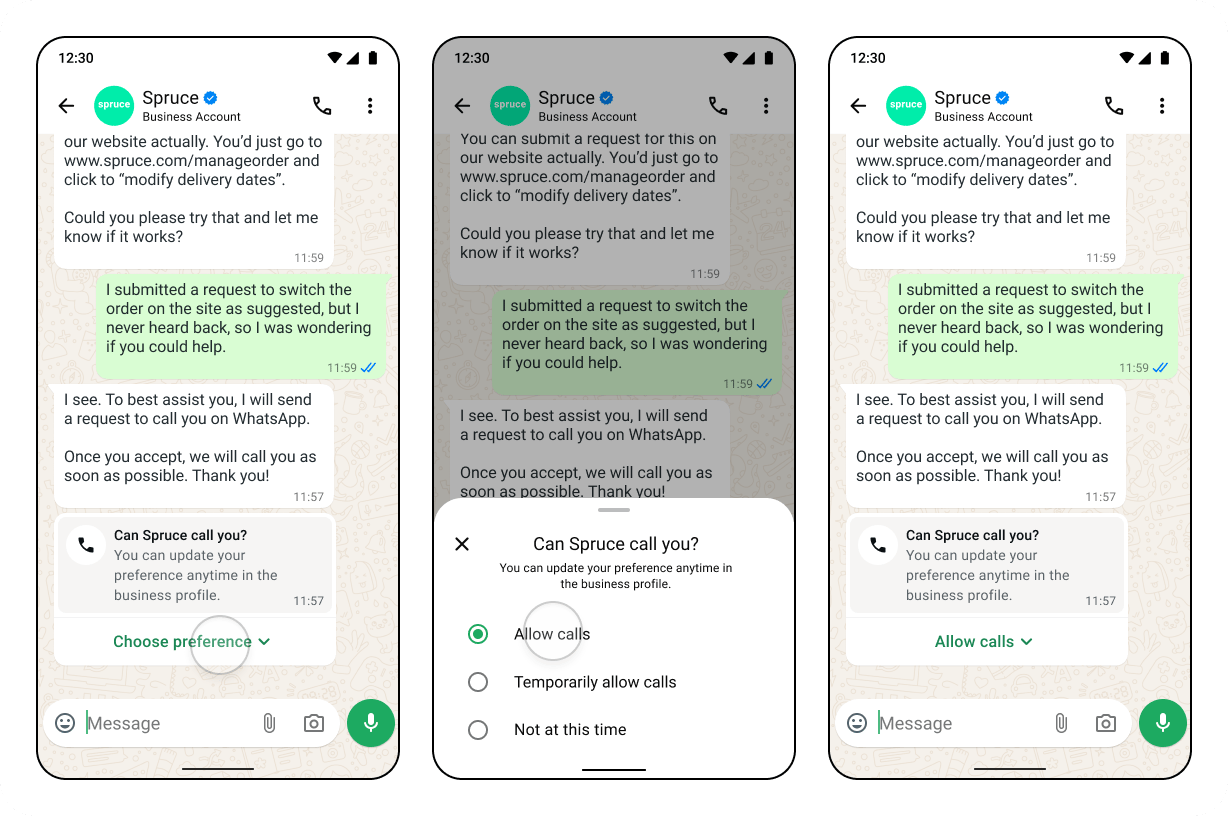 Image Source : Meta
#### What happens after they respond
| Customer's response | Can you call? | Details |
| ------------------- | ------------------------ | ------------------------------------------------------------------------------------- |
| Allows (permanent) | ✅ Yes, until they revoke | Stored indefinitely |
| Allows (temporary) | ✅ Yes, for 7 days | Window starts at the moment they approve |
| Declines | ❌ No | The request stays visible for 7 days; they can still change their mind in that window |
| No response | ❌ No | The request expires after 7 days |
***
### Placing the Call
Once permission is active, click the call button in the conversation. Gallabox shows a quick confirmation with the customer's name and how long the permission is still valid (e.g. *"Permission valid · 6 days left"*). Confirm, and the call connects.
***
### Limits You Should Know About
These apply per business number + customer pair:
* **Permission requests:** at most **1 per 24 hours** and **2 per 7 days** to the same customer. (Both counters reset whenever a connected call happens between you and that customer.) If you hit a limit, the send button is disabled and tells you when you can try again.
* **Connected calls:** up to **100 connected calls every 24 hours** per business number.
* **Unanswered/rejected calls:**
* After the **2nd consecutive** missed or rejected call, Meta sends the customer a message asking them to reconsider allowing your calls.
* After the **4th consecutive** missed or rejected call, Meta **automatically revokes** the permission. The customer is notified and can re-grant it if they wish.
***
### Pricing
* **Outgoing calls:** charged based on the call's duration and the destination country, and **deducted from your Gallabox message credits**.
* **Permission request template:** sent as utility template and billed at standard per-message rates.
Note: A minimum balance is needed to start a call. If your message credit balance falls below the cost of one minute (Rs. 1 / 10 cents), outgoing calls are blocked until you top up — so it's worth keeping enough credit on hand to cover your expected calling.
See [Pricing](/whatsapp/calling/pricing) for the full country-by-country rate card.
***
*Outgoing calling behavior depends on Meta's WhatsApp Business Calling rules, which may change.*
Image Source : Meta
#### What happens after they respond
| Customer's response | Can you call? | Details |
| ------------------- | ------------------------ | ------------------------------------------------------------------------------------- |
| Allows (permanent) | ✅ Yes, until they revoke | Stored indefinitely |
| Allows (temporary) | ✅ Yes, for 7 days | Window starts at the moment they approve |
| Declines | ❌ No | The request stays visible for 7 days; they can still change their mind in that window |
| No response | ❌ No | The request expires after 7 days |
***
### Placing the Call
Once permission is active, click the call button in the conversation. Gallabox shows a quick confirmation with the customer's name and how long the permission is still valid (e.g. *"Permission valid · 6 days left"*). Confirm, and the call connects.
***
### Limits You Should Know About
These apply per business number + customer pair:
* **Permission requests:** at most **1 per 24 hours** and **2 per 7 days** to the same customer. (Both counters reset whenever a connected call happens between you and that customer.) If you hit a limit, the send button is disabled and tells you when you can try again.
* **Connected calls:** up to **100 connected calls every 24 hours** per business number.
* **Unanswered/rejected calls:**
* After the **2nd consecutive** missed or rejected call, Meta sends the customer a message asking them to reconsider allowing your calls.
* After the **4th consecutive** missed or rejected call, Meta **automatically revokes** the permission. The customer is notified and can re-grant it if they wish.
***
### Pricing
* **Outgoing calls:** charged based on the call's duration and the destination country, and **deducted from your Gallabox message credits**.
* **Permission request template:** sent as utility template and billed at standard per-message rates.
Note: A minimum balance is needed to start a call. If your message credit balance falls below the cost of one minute (Rs. 1 / 10 cents), outgoing calls are blocked until you top up — so it's worth keeping enough credit on hand to cover your expected calling.
See [Pricing](/whatsapp/calling/pricing) for the full country-by-country rate card.
***
*Outgoing calling behavior depends on Meta's WhatsApp Business Calling rules, which may change.*