
WhatsApp Human Calling — Outgoing Calls
Outgoing calls (also called Business Initiated Calls) are when your agent calls a customer from within a conversation. Because WhatsApp protects users from unwanted calls, your business must have the customer’s permission first. That permission flow is the most important part of this guide.Before you begin: Outgoing calls are restricted by Meta for numbers in the USA, Canada, Egypt, Vietnam, and Nigeria. If your business number is in one of these countries, you can receive calls but can’t place them until Meta enables it.
Call Permission Requests (The Key Concept)
Your business can’t call a customer out of the blue. The customer must grant permission first.How you request permission
There are two ways to send a permission request:- They call you — when a customer calls your business, they automatically grant temporary permission for you to call back.
- Through your Business Profile — they can allow calls directly from your profile in WhatsApp.
What the customer sees and chooses
The request arrives in their WhatsApp as two parts: your message text, followed by a native card titled “Can [Your Business] call you?” with a Choose preference button. Tapping it gives them three options:- Allow calls → permanent permission (no expiry; they can revoke anytime).
- Temporarily allow calls → permission valid for 7 days.
- Not at this time → declined.
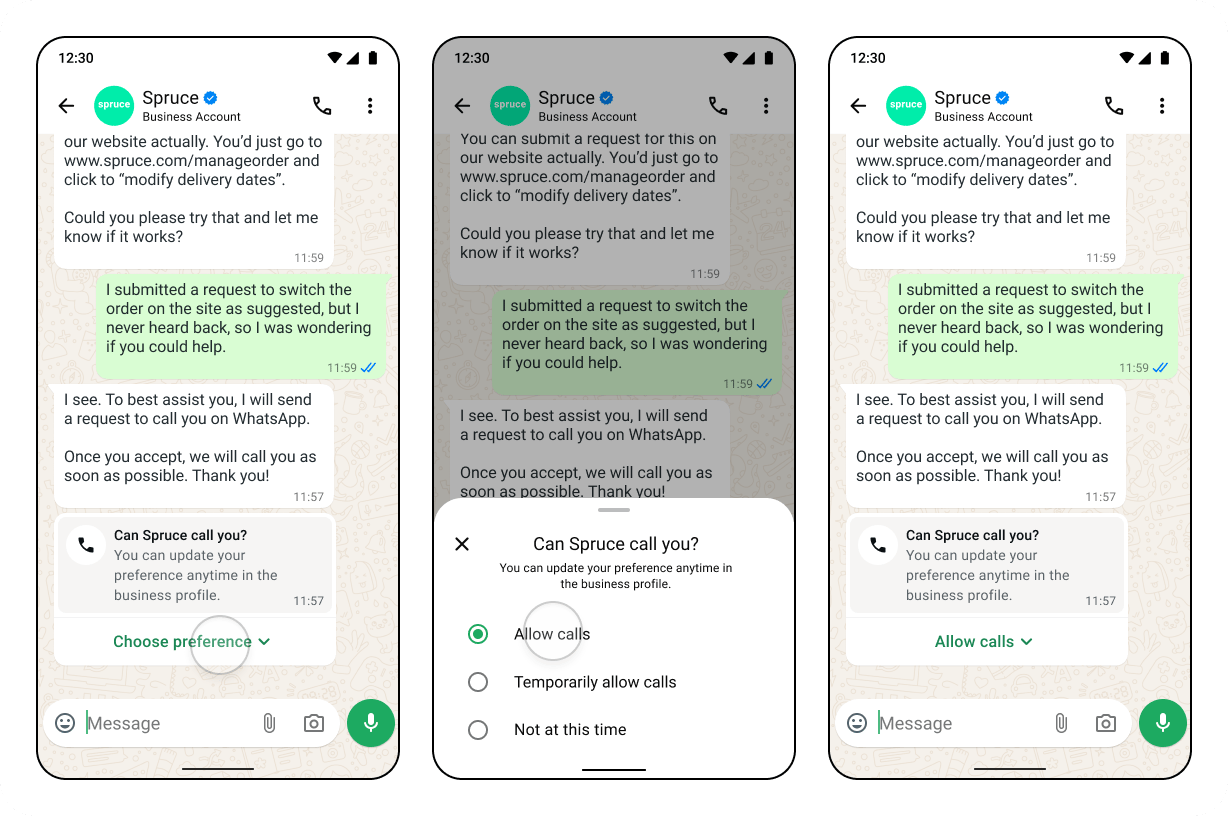
What happens after they respond
Placing the Call
Once permission is active, click the call button in the conversation. Gallabox shows a quick confirmation with the customer’s name and how long the permission is still valid (e.g. “Permission valid · 6 days left”). Confirm, and the call connects.Limits You Should Know About
These apply per business number + customer pair:- Permission requests: at most 1 per 24 hours and 2 per 7 days to the same customer. (Both counters reset whenever a connected call happens between you and that customer.) If you hit a limit, the send button is disabled and tells you when you can try again.
- Connected calls: up to 100 connected calls every 24 hours per business number.
- Unanswered/rejected calls:
- After the 2nd consecutive missed or rejected call, Meta sends the customer a message asking them to reconsider allowing your calls.
- After the 4th consecutive missed or rejected call, Meta automatically revokes the permission. The customer is notified and can re-grant it if they wish.
Pricing
- Outgoing calls: charged based on the call’s duration and the destination country, and deducted from your Gallabox message credits.
- Permission request template: sent as utility template and billed at standard per-message rates.
Outgoing calling behavior depends on Meta’s WhatsApp Business Calling rules, which may change.